Project Details for AREA - Automation Platform
AREA (Action-REAction) - Automation Platform
Overview
AREA is an innovative automation platform inspired by services like IFTTT and Zapier, designed to help users create powerful automated workflows by connecting various digital services. The platform enables users to create custom "if this, then that" scenarios, where actions in one service can trigger reactions in another.
🎯 Key Features
Service Integration
- Multiple Service Support
- Google Suite (Gmail, Drive, Calendar)
- Microsoft Services (Outlook, OneDrive)
- Social Media (Discord, GitHub, Twitch)
- Custom Timer Service
Automation Workflows
- Action-Reaction Chains
- Trigger-based automation
- Real-time monitoring
- Custom workflow creation
- Conditional execution
Cross-Platform Support
- Web Interface: Modern, responsive dashboard
- Mobile App: Native Android application
- REST API: Robust backend services
🛠️ Technical Architecture
Three-Tier Architecture
📱 Mobile Application (My Primary Contribution)
As the sole mobile developer on the team, I was responsible for creating the entire mobile experience using Flutter. The mobile app provides all platform functionality in a native, performant package.
Key Mobile Features
-
Authentication System
- Email/Password login
- OAuth2 integration with multiple services
- Secure token management
dartCode// Example of secure token storage implementation final storage = FlutterSecureStorage(); await storage.write(key: 'auth_token', value: token); -
Service Management
- Dynamic service connection
- OAuth authentication flows
- Real-time status monitoring
-
Workflow Creation
- Intuitive workflow builder
- Service action selection
- Reaction configuration
- Real-time validation
-
User Experience
- Material Design 3
- Dark/Light theme support
- Localization (English/French)
- Responsive layouts
Mobile Tech Stack
- Framework: Flutter
- State Management: Provider
- Security: Flutter Secure Storage
- Networking: Dio
- UI Components: Material Design 3
🎨 User Interface
Mobile App Screenshots
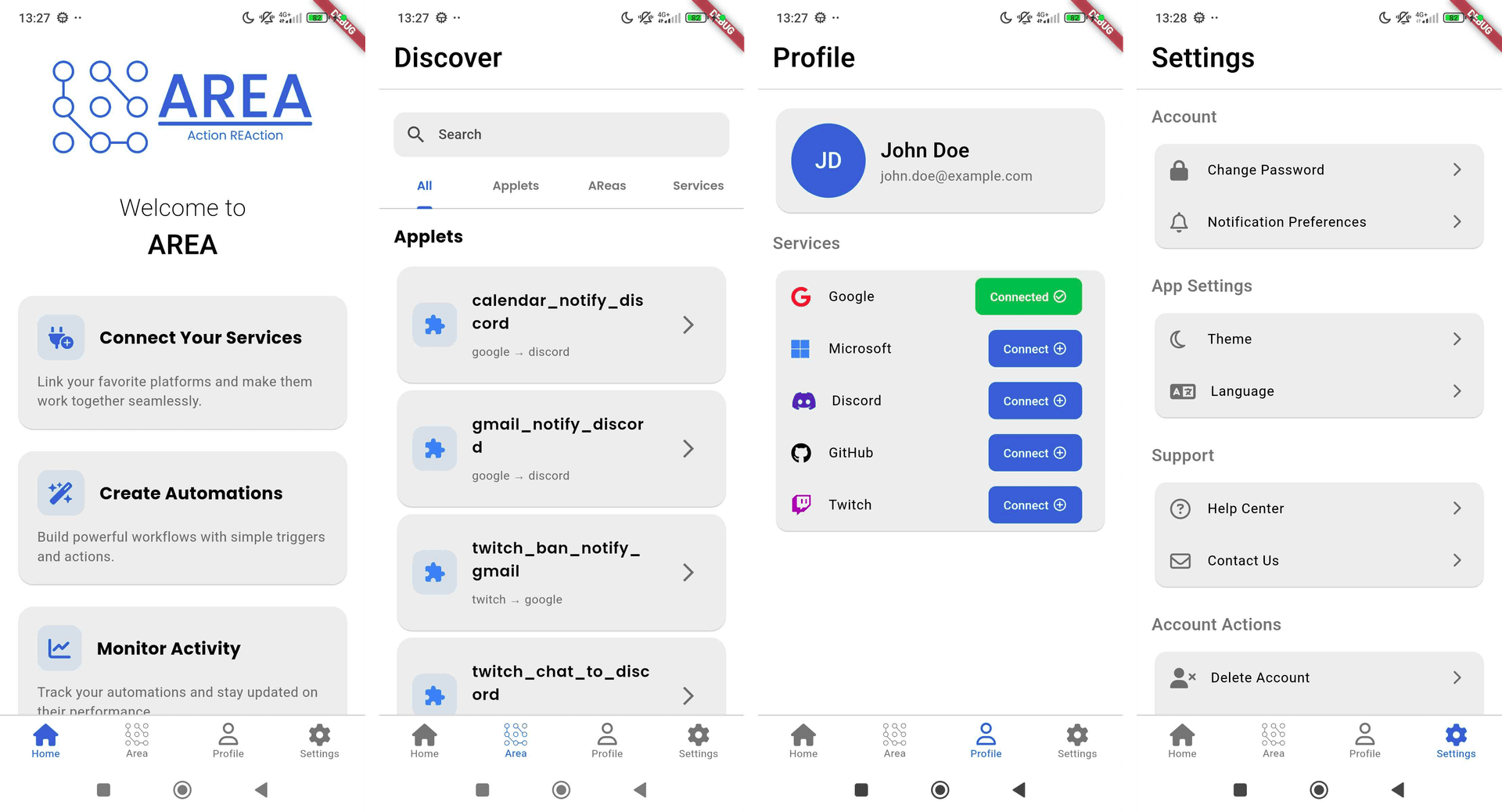
Left to right: Home, Dashboard, Profile with Service Connection, Settings
Key Design Principles
-
Intuitive Navigation
- Bottom navigation bar for core features
- Gesture-based interactions
- Consistent back navigation
-
Visual Feedback
- Loading states
- Success/error animations
- Progress indicators
-
Accessibility
- High contrast options
- Screen reader support
- Adjustable text sizes
🤝 Team Collaboration
As a team of four, we divided responsibilities while maintaining collaborative development:
-
Mobile Development (My Role)
- Full mobile app development
- Android testing
-
Additional Contributions
- Documentation management
- Web client assistance
- API integration support
📚 Documentation Management
While focusing on mobile development, I also managed the project's documentation:
- Created comprehensive API documentation
- Maintained development guidelines
- Wrote user guides
- Coordinated team documentation efforts
🌟 Key Achievements
-
Mobile App Development
- Built a full-featured mobile client from scratch
- Implemented secure OAuth2 flows
- Created an intuitive automation interface
-
Team Collaboration
- Managed documentation process
- Provided cross-team support
- Maintained code quality standards
🎯 Impact and Results
- User Experience: Created an intuitive mobile interface for complex automation tasks
- Maintainability: Established clear documentation and coding standards
- Integration: Successfully integrated with multiple third-party services
🔮 Future Potential
The platform has several exciting possibilities for future enhancement:
-
Extended Service Integration
- Additional social media platforms
- Smart home device support
- Custom API integration
-
Advanced Automation
- Multi-step workflows
- Conditional branching
- Schedule-based triggers
-
Enhanced Mobile Features
- iOS support
- Widget support
- Offline capabilities
🎓 Learning Outcomes
This project provided valuable experience in:
- Large-scale mobile application development
- OAuth2 implementation and security
- Team collaboration and documentation management
- Cross-platform integration
- API design and implementation
🏆 Conclusion
AREA demonstrates the power of modern cross-platform development and automation. As the mobile developer, I successfully delivered a robust, user-friendly mobile application while contributing to the broader project success through documentation management and team collaboration.
The project showcases my ability to:
- Develop complex mobile applications
- Implement secure authentication flows
- Create intuitive user interfaces
- Manage project documentation
- Collaborate effectively in a team setting
Note: This project was developed as part of a team of four developers, with my primary focus on mobile development and documentation management.